


NextLog
4.1104.00 Reviews
App Specs
- Version
- 1.2.1
- Updated On
- License
- Free
- Downloads
- 1,000,000+
- Developer
- CODEWALL DIJITAL HIZMETLER LIMITED SIRKETI
- Categories
- Parenting
- Platform
- Android
Screenshots
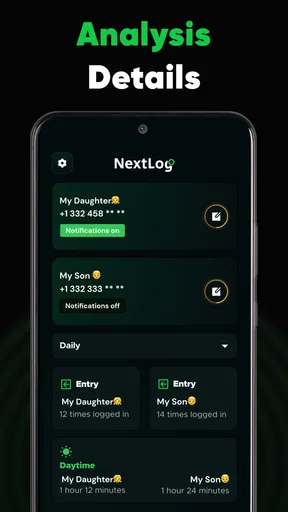
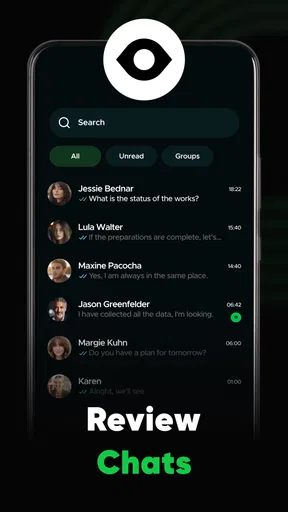
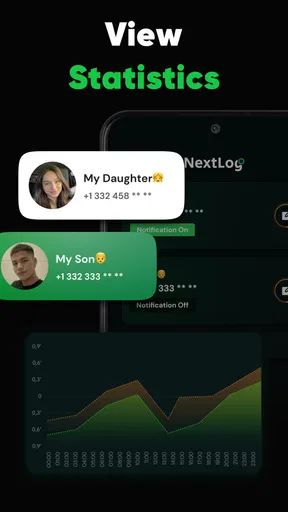
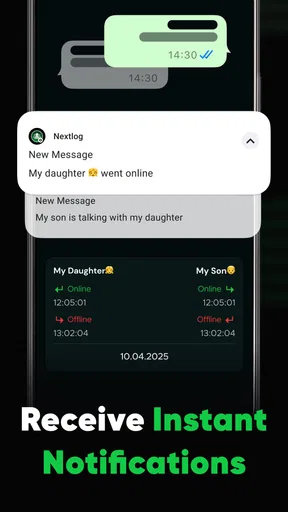
 Analysis by AppCompare
I judge a productivity app not only by how neatly it stores information, but by what happens when I need something while moving between places or relying on an unpredictable connection. That distinction matters with NextLog, an app in the parenting category whose stated purpose is to keep track of online activity. I would approach it as a monitoring tool, not as a general-purpose organizer: the usefulness depends on what activity you want to follow, how often you can connect, and whether everyone involved understands the arrangement.
Using NextLog in connected, everyday life
I find that a connected routine matters more here than constant checking: a brief review at a calm moment is easier to interpret than a glance made while rushing between errands. In this section, I’ll focus on how network access shapes those everyday checks, then consider what to do when updates feel delayed and how to keep monitoring purposeful.
When the network is part of the experience
Monitoring online activity naturally makes connectivity central. If the phone or the activity being monitored is not connected, a parent should not assume that information will appear immediately or that every event will be captured in real time. I would treat the app as a way to stay informed when the relevant devices and services can communicate, rather than as a guarantee of uninterrupted visibility. That is a useful expectation to set before relying on it for a time-sensitive concern.
For example, imagine checking in after school to understand whether a child has been online while waiting for a ride. A connected check-in may help you have a more informed conversation, but it should not replace asking the child directly or agreeing on household expectations in advance. If the connection is weak, I would avoid drawing conclusions from a quiet screen: lack of fresh information is not proof that nothing happened.
Mobile moments call for a lighter routine
A parenting monitor is most practical when it fits into a routine rather than prompting constant checking. I would choose a couple of sensible moments—perhaps after school and before bedtime—to review what is available, instead of opening the app every few minutes. That keeps the phone from becoming another source of anxiety and leaves more room for direct family conversations.
This approach is especially relevant when a parent is commuting, working, or sharing care duties. A quick glance while connected can be convenient, but trying to interpret activity while distracted is a poor substitute for a calm review. If several adults are involved, it is worth agreeing on who checks and when, so the app supports coordination instead of creating duplicate monitoring or conflicting responses.
The app is free to download, with in-app purchases listed at $4.99 to $14.99 per item. I would start by understanding what the free experience covers and what a purchase changes before paying; the price range alone does not tell you which option fits your needs. It is rated for Everyone, but that age label should not be confused with a recommendation that children use a monitoring tool without an age-appropriate explanation.
Worth Reading Before You Choose

Flipboard Shows What News Apps Must Do Beyond the Feed

Switching to Android Auto Means Rethinking Your Driving Routine

Google Calendar Makes a Crowded Week Easier to Manage

Ludo King Makes the Most of the Minutes Between Plans

Baby Panda World Brings Quick Play to Modern Phones, but Its Game Library Feels Busy

ESPN’s Live Game View Makes Following Close Games Easier
What to do when updates seem delayed
Any tool that depends on online activity can feel unreliable when the network, device, or app is not communicating as expected. My first step would be to check the basic conditions: is the device online, is the app open and functioning, and is the information you are looking for recent? I would then reopen the app or try again when the connection is steadier before treating a delay as evidence of a problem.
That small pause is more than troubleshooting; it is a safeguard against overreacting. A missed update can have several ordinary explanations, so I would use the app as one input rather than a complete account of a child’s day. If an important safety issue is unfolding, contacting the child or another responsible adult directly is more appropriate than waiting for a monitoring screen to refresh.
I also recommend setting expectations before the first check. Tell children what you intend to monitor, why you are doing it, and what would lead you to talk with them. That makes the tool less likely to feel like secret surveillance and gives the family a chance to agree on boundaries. The right level of oversight changes with a child’s age and circumstances; a fixed, silent monitoring habit is not automatically the best choice.
Keep data use deliberate
Because the app concerns online activity, I would use it with a clear purpose rather than collecting or checking information simply because it is available. Decide what questions you need it to help answer, and avoid turning ordinary daily use into a running investigation. This keeps attention on patterns that matter to your family instead of isolated moments that may be easy to misread.
It is also sensible to consider how many people need access and which phone you use for check-ins. Keeping the routine limited to the adults responsible for care can reduce confusion and make it easier to discuss what you have seen. I would not share access casually or use the app to settle every disagreement; a monitoring tool can provide context, but it cannot explain intent or replace trust-building.
Who will find this approach useful
I see the strongest case for NextLog in a household that wants a practical way to stay informed about online activity and is willing to pair that awareness with straightforward conversations. It may suit a parent who needs occasional visibility while balancing work and family logistics, particularly when the child’s device is usually connected and the adults have agreed on what monitoring means.
It is less suitable for someone seeking a broad family organizer, a shared calendar, or a place to manage chores and school schedules. Those jobs are better handled by tools built specifically for calendars, task lists, or family coordination. Likewise, if your priority is a detailed conversation about digital wellbeing rather than ongoing monitoring, direct check-ins and the device’s own controls may be a better starting point. I would skip this app if its monitoring role does not match a clearly explained need.
Compared with the usual alternatives in parenting, NextLog belongs in a different lane from screen-time limits and device settings. Those controls are generally aimed at setting boundaries on a device; monitoring is about keeping a parent informed. The two approaches can complement each other, but neither automatically does the other’s job. Before choosing, decide whether you need awareness, limits, or both, then avoid paying for a tool that solves a different problem.
A closer look at the app and its fit
The app is developed by CODEWALL DIJITAL HIZMETLER LIMITED SIRKETI. It has a 4.2 average from around 153,000 ratings, and more than a million installs. It was released on February 4, 2025; version 1.1.7 requires Android 8.0 or later. Those details suggest it has attracted a sizeable audience, but they do not answer the more personal question: whether its monitoring approach fits your family’s expectations and daily routine.
One practical tip is to decide what a useful check-in looks like before you begin. If you cannot name the kind of information that would change a conversation or a decision, checking more often may add worry without adding insight. Another is to make a plan for connection gaps: retry later, verify directly when necessary, and do not interpret an absence of new information as a definitive report.
My overall view is that a monitoring app works best when it stays in its proper role: a prompt for informed parenting, not a substitute for communication or judgment. The free entry point makes it possible to consider the app without an upfront purchase, while the optional items mean it is worth checking the costs against the features you actually intend to use. For families who want online-activity awareness and can set clear boundaries around it, NextLog may be worth exploring. For anyone after an all-in-one parenting planner, or a guarantee of continuous updates regardless of connectivity, a different kind of tool is the more sensible choice.
Have you ever felt like your life’s a bit of a mess with all the notes, reminders, and tasks scattered in different apps? Trust me, I’ve been there. That’s when I stumbled upon NextLog, and oh boy, it’s like finding a unicorn in a sea of horses! This app has swiftly become my go-to for managing everything from grocery lists to work projects. So, let me take you on a little journey through my experience with NextLog.
First Impressions
The first thing that struck me about NextLog was its sleek and intuitive design. I mean, who doesn't love an app that's easy on the eyes? Opening it up, I was greeted by a clean interface that didn’t overwhelm me with options. The sign-up process was a breeze, too. In less than a minute, I was all set to dive into its features.
Features that Shine
NextLog excels in its ability to seamlessly integrate various functionalities. You can create notes, set reminders, and track tasks all in one place. One feature that I absolutely love is the tagging system. It’s like having a personal assistant who organizes everything for you. You can tag notes, tasks, and even events, making it super easy to find what you need later.
"It’s like having a personal assistant who organizes everything for you."
Another nifty feature is the ability to sync across multiple devices. Whether I'm on my tablet at home or my phone on the go, I can access my data anywhere, anytime. This has been a game-changer for me!
User Experience
Using NextLog feels like a breath of fresh air. The app is incredibly responsive, and I haven’t experienced any lag or crashes. The developers deserve a pat on the back for creating such a stable app! The customization options are also a nice touch. You can tweak the appearance to match your personal style, which is a small but delightful feature.
Learning Curve
If you’re worried about a steep learning curve, fear not! NextLog is super user-friendly. The app offers a handy tutorial for new users, which I found quite helpful. Even if you skip the tutorial, the app is intuitive enough that you'll be navigating like a pro in no time. It’s perfect for both tech-savvy users and those who are a little more tech-challenged.
Interactivity and Collaboration
One thing that sets NextLog apart is its collaborative features. You can share notes and tasks with others, making it perfect for team projects or family plans. I tried this feature with a couple of colleagues, and it worked seamlessly. Everyone was on the same page, and it made coordinating tasks a breeze.
Final Thoughts
After using NextLog for a few weeks, I can confidently say it’s a powerhouse of productivity. It manages to simplify my chaotic schedule while keeping everything organized and easily accessible. With its user-friendly interface and robust features, it’s an app I’d recommend to anyone looking to streamline their life.
So, if you’re tired of juggling multiple apps for notes and tasks, give NextLog a shot. You might just find it’s the unicorn you’ve been searching for!
Pros
- Intuitive user interface for easy navigation.
- Real-time syncing across multiple devices.
- Customizable notifications and alerts.
- Supports offline access for convenience.
- Robust data encryption for security.
Cons
- Limited free version features.
- Occasional sync delays reported.
- No integration with third-party apps.
- Requires regular updates for optimal use.
- Customer support response time can be slow.
FAQs for NextLog
What is NextLog and what are its primary features?
NextLog is a comprehensive task management app designed to streamline your daily productivity. It offers features like task scheduling, reminders, collaborative lists, and integration with calendar apps. The user-friendly interface allows for easy navigation and customization, making it suitable for both individuals and teams looking to enhance productivity.
Is NextLog available on both Android and iOS?
Yes, NextLog is available for download on both Android and iOS platforms. The app is optimized for performance on both operating systems, ensuring a smooth user experience. Users can download it from the Google Play Store for Android devices and the Apple App Store for iOS devices.
Does NextLog offer any collaboration features?
NextLog provides robust collaboration tools, allowing users to share task lists and project details with team members. Users can assign tasks, set deadlines, and track progress collectively, making it an ideal choice for teams and organizations looking to improve workflow and communication.
How does NextLog ensure data privacy and security?
NextLog prioritizes user privacy and employs advanced security measures to protect data. It uses encryption for data storage and transmission, ensuring that user information remains confidential. Additionally, users have control over their data, with options for secure backups and account management.
Are there any subscription fees or in-app purchases in NextLog?
NextLog offers a free version with basic features, which is suitable for personal use. For advanced features and enhanced collaboration tools, users can opt for a premium subscription. The app provides various pricing plans, allowing users to choose based on their specific needs and budget.


